
Improving 3D Transform Rendering In WebKit

Typically, elements on a web page are rendered on a viewport plane perpendicular to the viewer. This corresponds to the screen or surface where the web content is displayed. An individual element can have 3D transformations (e.g., rotateX, rotateY, translateZ) applied to it, and it will render with the intended 3D effect, including perspective if the parent container has a perspective property. However, the children of the transformed element will not maintain their own 3D transformations in the same 3D space. Instead, they will be “flattened” onto the 2D plane of the parent element.
<div class="parent">
    <div class="child">
        <div class="child-child"></div>
    </div>
</div>rr
.parent {
width: 100px;
height: 100px;
background: red;
transform: rotateY(45deg);
}
.child {
position: absolute;
top: 10px;
left: 10px;
width: 80px;
height: 80px;
background: blue;
transform: translateZ(20px);
}
.child-child {
position: absolute;
top: 10px;
left: 10px;
width: 60px;
height: 60px;
background: yellow;
transform: translateZ(20px);
}Result: Without transform-style: preserve-3d, the blue and yellow child elements appear flattened onto the parent’s 2D plane.
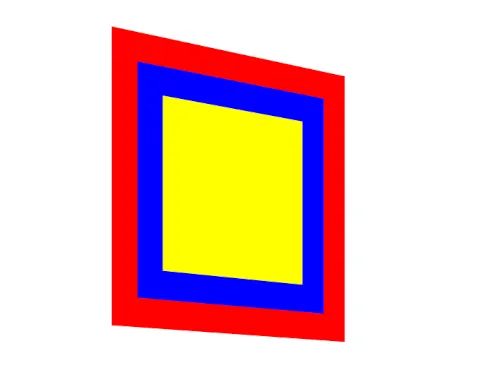
CSS provides a way to preserve transformations in 3D space using the transform-style: preserve-3d; property. Setting transform-style: preserve-3d; on the element ensures that its children retain their 3D transformations in the same 3D space.
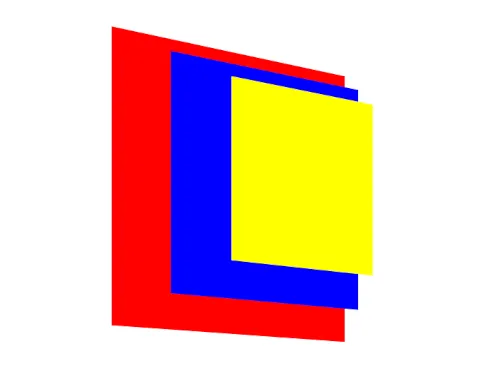
Result: With this adjustment, the child elements maintain their 3D transformations relative to the parent and the scene.
Challenges in WebKit’s preserve-3d Rendering
WebKit’s rendering pipeline promotes elements or groups of elements to compositing layers to render them efficiently using the GPU. While several properties can trigger layer promotion, I’ll focus on how preserve-3d interacts with this pipeline. An element with preserve-3d causes all its child elements with 3D transformations to be promoted to individual layers. These layers are then composed during the final stage of the rendering pipeline to produce the output frame.
In complex 3D scenes with intersecting elements and effects like translucency or filters, the composition of the layers can become problematic. While working on the Bringing WebKit Back to Android project, I encountered several flaws in preserve-3d rendering behavior in WPE WebKit, especially in scenes with many intersecting elements and effects. Similar issues were also present in the Epiphany browser (WebKitGTK-based). Upon investigation, I found that all non-Apple WebKit ports were rendering preserve-3d scenes incorrectly.
Apple’s WebKit uses the Core Animation framework to compose web page layers, while other ports use the TextureMapper component. TextureMapper is a mini scene graph designed for WebKit’s compositing needs. However, it didn’t handle preserving 3D transformations correctly for effect layers and struggled with rendering complex 3D intersections. It relied on the OpenGL depth buffer for intersections, which was insufficient for accurately rendering intricate scenes.
Example: Rendering Issues with TextureMapper
Here is an example scene with three translucent layers.
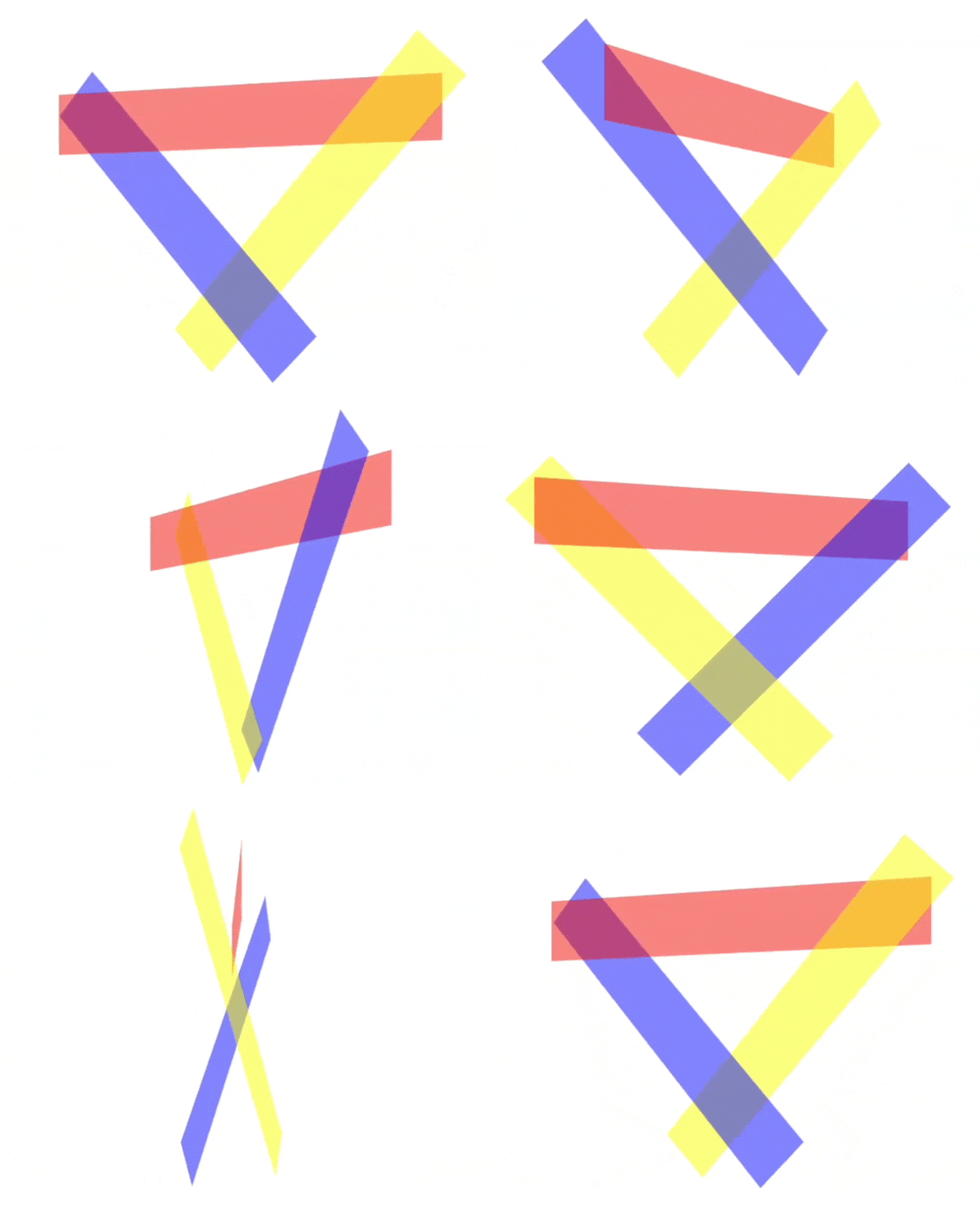
From the viewer’s perspective, all layers overlap each other.
Expected Rendering:
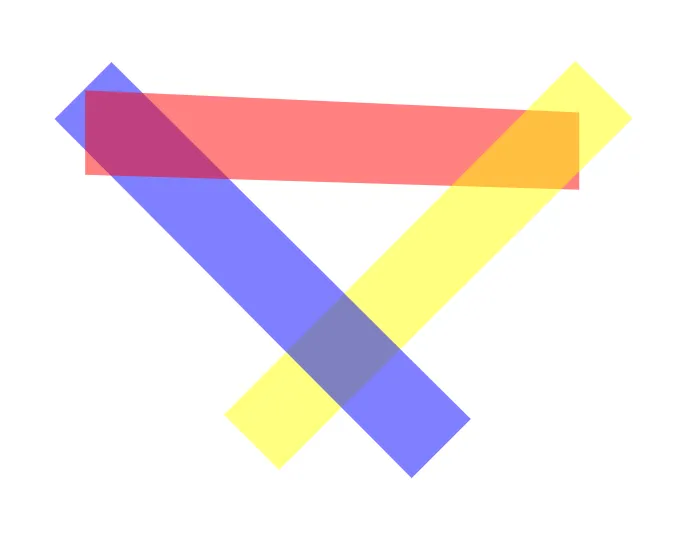
Incorrect Rendering with TextureMapper:

In the incorrect rendering, the red and yellow layers fail to show translucency. For correct results, elements need to be rendered in back-to-front order so that their content blends properly. However, when elements partially overlap in complex ways, TextureMapper couldn’t determine the correct rendering order due to the lack of necessary logic.
Implementing BSP Tree Rendering
To address these issues, I implemented a solution based on Binary Space Partitioning (BSP) trees and Newell’s algorithm for TextureMapper rendering. This approach efficiently organizes the scene’s geometry for rendering, intersection detection, and visibility determination.
Approach:
1. Collect Layers Participating in the 3D Rendering Context
Identify the element establishing the 3D rendering context (transform-style: preserve-3d) and all its child elements.
2. Compute Layers’ Positions in 3D Space
Calculate each layer’s corner vertices in 3D space using its accumulated transformation matrix. Add each layer’s 3D vertex points as a polygon to a list of polygons representing the scene’s geometry.
3. Sort and Split Layers Using a BSP Tree
- Choose a current polygon from the list of polygons.
- Create a BSP tree node for the polygon and add it to the node’s polygon list.
- Define the partitioning plane using the selected polygon.
- Classify other polygons in the scene into:
- Front Polygons: Entirely in front of the partitioning plane. Move these polygons to a list associated with the “front” node.
- Back Polygons: Entirely behind the partitioning plane. Move these polygons to a list associated with the “back” node.
- Intersecting Polygons: Polygons partially in front and partially behind the partitioning plane. Split these polygons into two parts and move them to the respective “front” and “back” lists.
- Recursively apply this process to subdivide the scene.
4. Handle Splitting of Layers
Instead of physically splitting a layer, calculate the regions of each polygon resulting from the intersection with the plane. Use this data to render only the relevant parts.
5. Traverse the BSP Tree for Rendering
Render polygons back-to-front relative to the viewer’s perspective to correctly handle intersections and occlusions.
6 Render Split Layers
Use the stencil buffer to clip and render regions of layers efficiently. This approach handles complex textures, videos, solid fills, and effects like opacity.
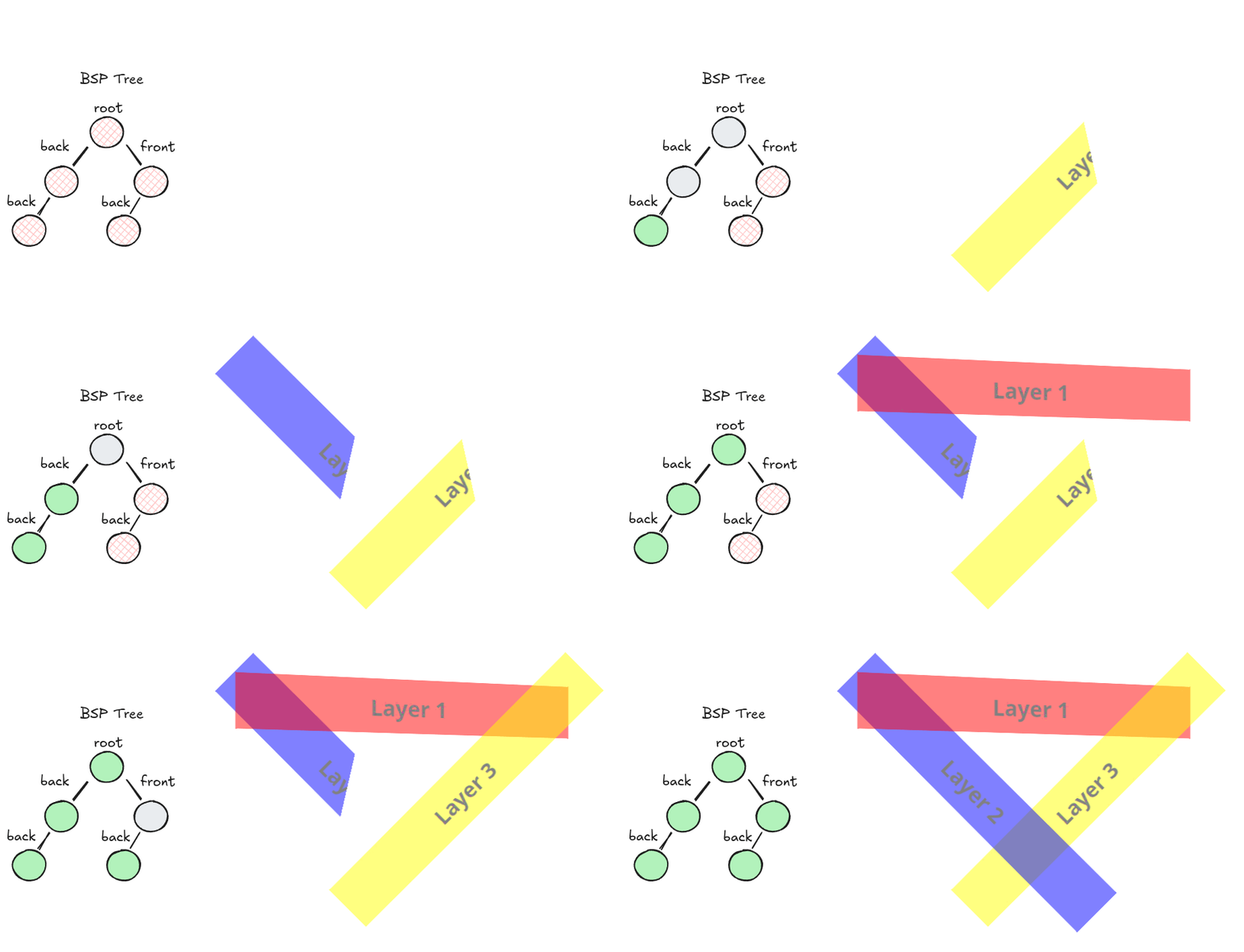
For more details, see Binary space partitioning
Adhering to CSS Transforms Module Level 2
This implementation aligns with the CSS Transforms Module Level 2, which specifies that intersections should be rendered according to Newell’s algorithm. Specifically:
“Intersection is performed between this set of planes, according to Newell’s algorithm, with the planes transformed by the accumulated 3D transformation matrix. Coplanar 3D transformed elements are rendered in painting order.”
Results and Impact
After implementing this solution in TextureMapper, both WPE WebKit and WebKitGTK achieved the ability to render complex preserve-3d scenes with high fidelity, fully aligning with the expected behavior outlined in the CSS specification. This enhancement significantly improved the visual consistency of 3D web content across all non-Apple WebKit-based platforms, effectively bridging the rendering quality gap between Apple’s implementation and other ports.
For implementation details, please refer to the following commits: